Visiminds Technologies, home

Our work

Use cases

Ways our products, consulting and training can help companies of any size, police and forensic laboratories.
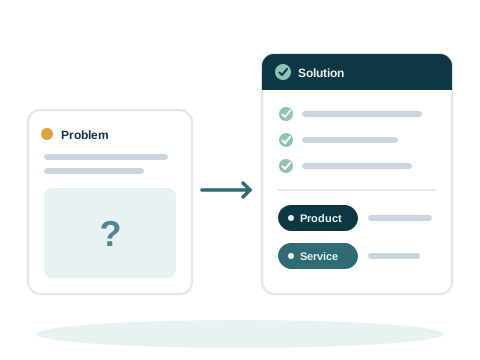
A problem card with an open question turns into a solution card with its steps ticked, tagged with a product and a service

Four ways we help

Each use case names the problem, what we do about it, and who it is for. Use cases 1 to 14 follow our portfolio. The others were added as the products grew.

Consulting

Four use cases for a virtual CISO (A fractional chief information security officer. Security leadership as a service. A virtual CISO sets your security direction, puts it in place with your team, and reports on it to management.), GRC (Governance, risk and compliance. Security policies, the review of risks, and meeting the rules and standards that apply to you.), VAPT (Vulnerability assessment and penetration testing. Finding the weak spots in apps, APIs, networks and cloud, and testing them the way an attacker would.) and cyber forensics.

Training, labs and practice

Four use cases for courses, forensics labs and a cyber range (A practice network where people learn to attack and defend safely.).

Products

With Ivy Insight and Ivy Lens

Ivy Insight checks the systems you run, as often as you like. Ivy Lens checks the code you build. They complement each other.
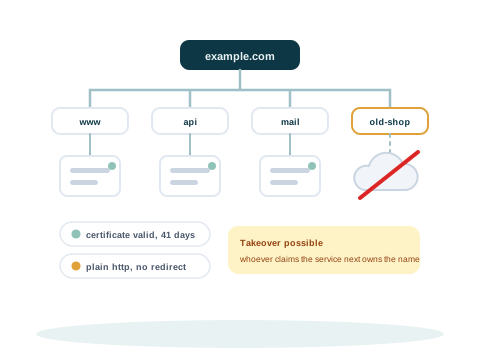
A domain at the top with the names beneath it discovered one by one, and one name still pointing at a cloud service that no longer exists, flagged as a takeover

Use case 1 · Ivy Insight

Scanning many sites and servers

The problem

Large companies run many websites, and each one can be attacked. Expired certificates are common.

What we do

  • Ivy Insight scans many sites and hosts, and writes a detailed report
  • It finds misconfiguration, with checks mapped to the OWASP Top 10 (OWASP's list of the ten most critical security risks to web applications.)
  • It shows how an outside attacker could get in, and how to fix it

Who it is for

  • Large enterprises
  • Small and medium companies
  • Startups
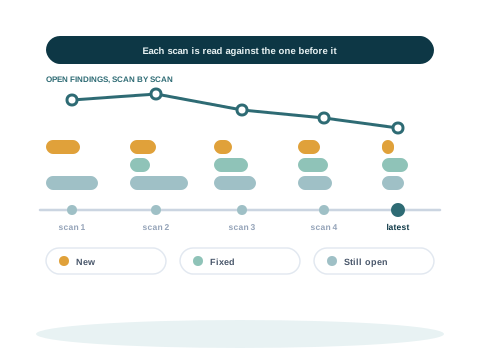
Five scans along a timeline, each compared with the one before it, showing what is new, what has been fixed and what is still open

Use case 2 · Ivy Insight

Secure settings for cloud accounts and endpoints

The problem

There is no clear view of how safely the cloud accounts are set up. Drift (Settings that move away from the approved baseline over time.) is found late and fixed slowly. Manual audits take a lot of effort.

What we do

  • Hosts checked control by control against the CIS Benchmarks (Free lists of secure settings for each kind of system, from the Center for Internet Security.), and endpoints (A laptop or desktop computer that people work on, in the office or away from it.) for patches and settings
  • Cloud accounts checked against the provider's own rules, with a read-only credential you grant
  • Repeat scans show what changed since the last one

Who it is for

  • Medium enterprises
  • Large enterprises
  • Startups
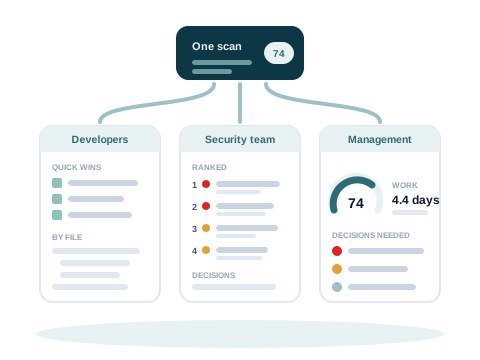
One scan cut into three reports, one for developers, one for the security team and one for management, so the numbers agree

Use case 3 · Ivy Lens

Checking code before every release

The problem

Weaknesses are found late, after the code ships. Some code must stay inside the company.

What we do

  • Ivy Lens checks your code, the packages it uses, passwords and keys in files, and infrastructure files
  • It runs on your own computer, even with no network
  • Findings are checked against the code, and each reader gets a report: developers, the security team and management

Who it is for

  • Development teams
  • Security teams
  • Regulated companies
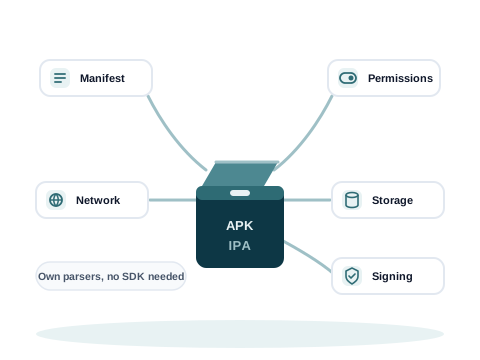
An Android or iOS build opened up into its manifest, permissions, network settings, storage and signing, read with Ivy Lens's own parsers

Use case 4 · Ivy Lens

Checking a mobile app before it reaches users

The problem

The app you ship is not always the code you reviewed. Keys, settings and old libraries end up in the build.

What we do

  • Mobile Scan, part of Ivy Lens, reads the Android or iOS build. It needs no source code
  • 58 checks in 10 analyses, from network settings to privacy
  • It runs on your own computer

Who it is for

  • App teams
  • Banks and financial technology companies
  • Agencies that build apps
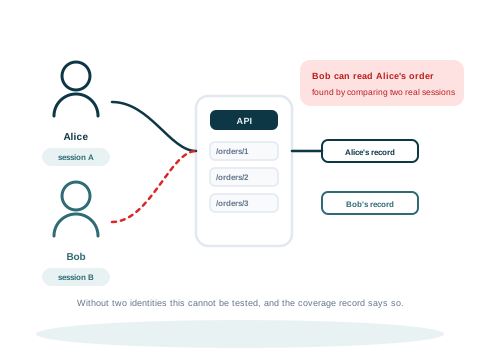
Two people each signed in to the same API, and the second one reading a record that belongs to the first, which is flagged as a broken authorisation

Use case 5 · Ivy Insight

Knowing what faces the internet

The problem

Forgotten subdomains (A name under your main domain, such as shop.example.com.), expired certificates and old records stay open to attack. An API (Application programming interface. The interface one program uses to talk to another.) can let one user read another user's data.

What we do

  • The attack surface (Everything an attacker can reach from outside: sites, services, addresses and names.) engine finds subdomains, certificates and dangling records (A DNS name that still points to a service that no longer exists, which someone else could claim.)
  • The web and API engines check headers, exposed files and access between users
  • Every finding gets a deadline, and an owner set by your own rules

Who it is for

  • Companies with many websites
  • API providers
  • Software companies
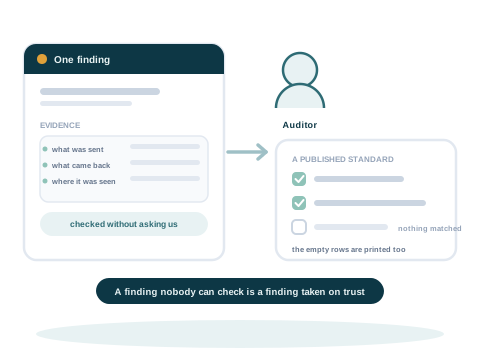
A finding with the evidence it rests on, handed to an auditor who ticks the standard it answers and keeps the record

Use case 6 · Ivy Insight

Evidence for audits and compliance

The problem

Auditors ask for evidence, not statements. Collecting it by hand takes time.

What we do

  • Benchmark checks keep the command and its output as evidence
  • Findings are mapped to standards such as ISO 27001 (ISO/IEC 27001. The international standard for an information security management system.), PCI DSS (Payment Card Industry Data Security Standard. The security rules for any company that stores, processes or sends payment card data.) and NIST CSF (NIST Cybersecurity Framework. A widely used framework from the US National Institute of Standards and Technology for organising security work.)
  • Each report shows what it covered and what it left out

Who it is for

  • Compliance teams
  • Auditors
  • Regulated companies
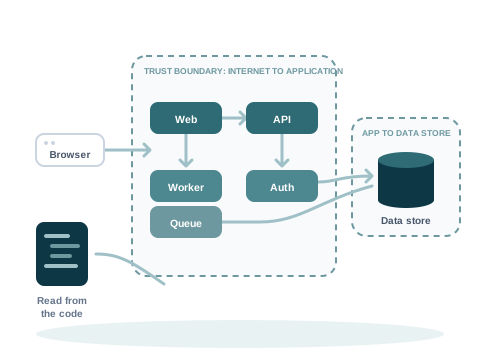
A component diagram with trust boundaries, recovered from the code: a browser outside, web, API and worker components inside the application boundary, and a data store behind its own boundary

Use case 15 · Ivy Lens

A threat model before a release

The problem

A threat model drawn by hand takes days, and it is out of date by the next release. The design files are spread across the repository.

What we do

  • Ivy Lens reads the code and the design files your team keeps, and draws the system with its trust boundaries (Where data passes from something you do not control into something you do.)
  • Each threat shows how likely it is, the harm it could do, the controls in place and the risk that is left (The part of a risk that is left once the controls in place are counted.)
  • Your team accepts, rejects or re-rates each threat, and a named person signs the model off

Who it is for

  • Development teams
  • Security architects
  • Regulated companies
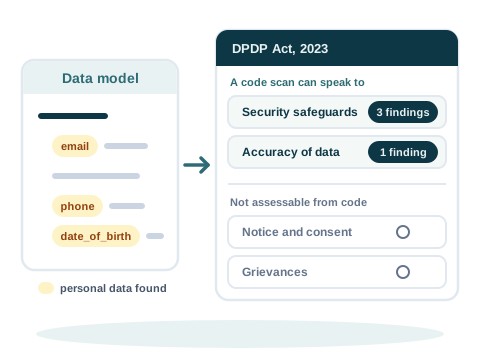
Personal data fields found in the code's data model, mapped to the parts of India's DPDP Act a code scan can speak to, such as security safeguards and the accuracy of data, while duties a scan cannot assess, such as notice, consent and grievances, are listed apart

Use case 16 · Ivy Lens

Personal data and India's DPDP Act

The problem

Companies in India must protect personal data under the DPDP Act (Digital Personal Data Protection. India's law on personal data in digital form: the DPDP Act, 2023, with the DPDP Rules, 2025. It sets duties for the organisations that use personal data, and rights for the people it is about.), 2023. It is hard to see where the code handles personal data, and what a code review can show.

What we do

  • Ivy Lens lists the personal data it finds in the code's data model
  • Findings are mapped to the sections of the Act a code scan can speak to, such as the security safeguards
  • Duties a code scan cannot assess, such as notice and consent, are listed apart, so the table shows the whole Act

Who it is for

  • Companies in India
  • Data protection teams
  • Compliance teams

The mapping supports a compliance review. It is not legal advice.
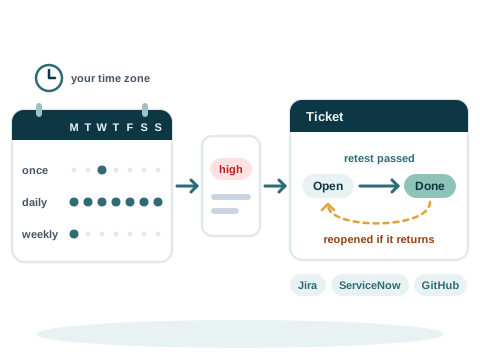
A calendar of scans that run once, daily or weekly in your time zone, a finding that opens one ticket in Jira, ServiceNow or GitHub, the ticket moved to done when a retest passes, and reopened if the finding returns

Use case 17 · Ivy Insight

Scans on a schedule, with tickets kept in step

The problem

Scans run by hand are easy to forget. Tickets drift away from the findings, and closing a ticket does not prove a fix.

What we do

  • Scans run once at a set time, daily or weekly, in the time zone you choose
  • Each finding at or above the severity you choose opens one ticket in Jira, ServiceNow or GitHub, and its status is read back
  • A fix proved by a retest moves the ticket to done. If the finding comes back, the ticket opens again

Who it is for

  • Security operations teams
  • IT teams
  • Companies with many systems

Products

With Ivy Farsight

Ivy Farsight reads the findings you already have, from audits, scanners and reviews, and turns them into decisions.
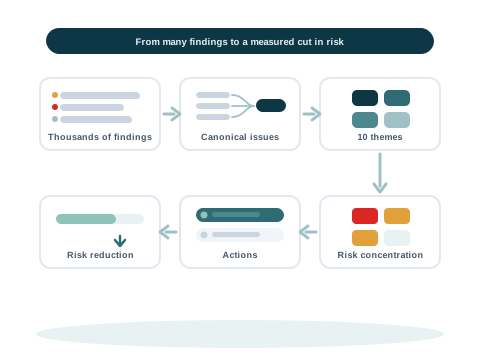
Findings become canonical issues, then themes, then risk concentration, then actions, then a measured risk reduction

Use case 18 · Ivy Farsight

Thousands of findings, a few real problems

The problem

Audits, scanners and reviews leave a company with thousands of open findings. Counted one by one, the few weak controls behind them stay hidden.

What we do

  • Ivy Farsight groups findings with one cause into canonical issues (One underlying problem that many findings describe. Findings that agree on their control, threat path, text, assets and timing are grouped into one canonical issue.), and issues into themes (A group of canonical issues that management can steer as one topic, such as vulnerability management or access control.) for management
  • Each group shows its score and its reason, and an analyst reviews the close calls
  • Every theme opens down to the original rows of your file

Who it is for

  • Security leaders
  • Risk and compliance teams
  • Internal audit
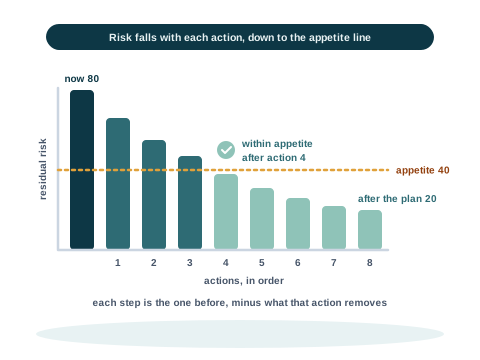
A step chart of residual risk that falls with each planned action, crosses the risk appetite line after the fourth action, and ends at the risk left after the plan

Use case 19 · Ivy Farsight

Deciding what to fix first

The problem

Management must choose a few actions from many. It needs to see how much risk each one removes, and when the risk falls within its appetite.

What we do

  • Inherent (The risk before any control is counted: how likely it is, multiplied by how much harm it would do.) and residual risk for each issue, each with its formula and its inputs
  • Two or three control options for each issue, compared on the risk they remove, the effort and the time
  • A plan that shows the risk after each action, against your risk appetite (The amount of risk a company decides it is willing to accept.) line

Who it is for

  • Leadership teams
  • Risk committees
  • Security leaders
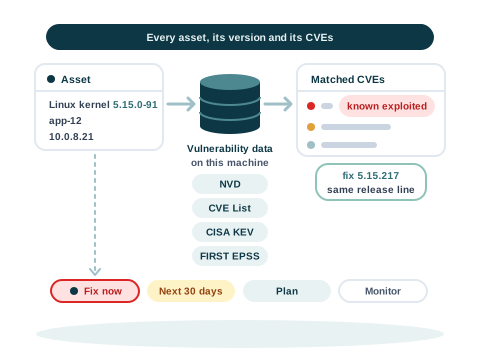
An asset with its product and version is matched against vulnerability data kept on the machine, gets its CVEs with one known to be exploited and a fix version on the same release line, and is placed in one of four bands from fix now to monitor

Use case 20 · Ivy Farsight

Matching assets to known vulnerabilities

The problem

A findings list names hosts and versions, but not which known vulnerabilities they carry, or which version fixes them.

What we do

  • Each asset's product and version are matched to CVEs (Common Vulnerabilities and Exposures. The public identifier for one known vulnerability in one product.), from vulnerability data kept on your machine
  • Known exploited CVEs come first, and the fix stays on the installed release line (The versions of a product that share their first numbers, such as 5.15. A fix on the same line is a smaller change than a move to a new line.) where that line has one
  • Each asset is placed in a group, from fix now to monitor, with its reasons

Who it is for

  • Infrastructure teams
  • Vulnerability management teams
  • IT operations
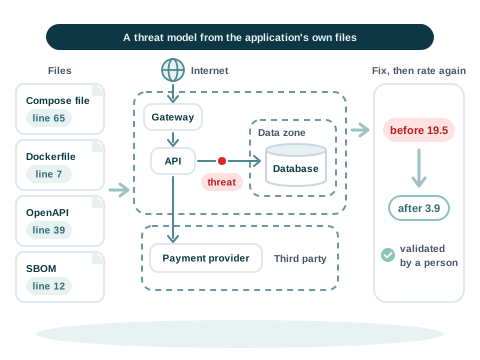
The application's deployment files, each fact kept with its file and line, become a data flow diagram with internet, data zone and third party boundaries, a threat is marked on one flow, and after a fix the threat is rated again and validated by a person

Use case 21 · Ivy Farsight

A threat model of an application, from its files

The problem

A threat model often starts from interviews and a blank page. It takes days, and the evidence behind each part is lost.

What we do

  • Ivy Farsight reads the application's deployment files, and every fact keeps its file and line
  • It drafts a data flow diagram (Data flow diagram. A drawing of the parts of a system and the data that moves between them, with the trust boundaries the data crosses.) and the threats against named parts, and a person confirms each one
  • After a fix is made and validated, the threat is rated again, and the time saved is measured stage by stage

Who it is for

  • Security architects
  • Application teams
  • Assessors

Today this works on the demo application that comes with Ivy Farsight.
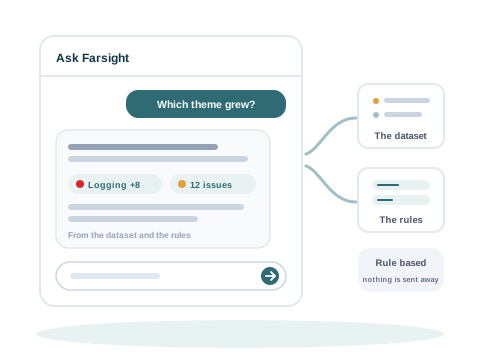
A question answered from the dataset and the rules inside the product, with the figures it used linked, and nothing sent away

Use case 22 · Ivy Farsight

Answers for management, from your own findings

The problem

Management asks which theme grew, or what to fix first. Answering from a large spreadsheet by hand takes days.

What we do

  • Ask Farsight answers questions in plain words, from the analysis and fixed rules
  • Each answer links to the figures it used, and every figure opens to its source row
  • A local language model (A text model that runs on your own machine, with no internet connection. In Ivy Farsight it only words the facts the rules worked out, and never changes a number.) can word the answer. It never changes a number

Who it is for

  • Managers
  • Auditors
  • Risk owners
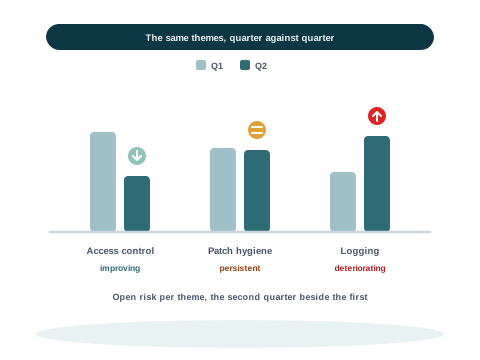
Two bars per theme compare the first and the second quarter, with one theme improving, one persistent and one deteriorating

Use case 23 · Ivy Farsight

Tracking findings from quarter to quarter

The problem

Each quarter brings a new export. It is hard to see which problems are improving, which persist, and which findings are past their agreed fix time.

What we do

  • Each new export of the same kind runs with the column mapping you approved before
  • Each theme shows whether it is improving, persistent or deteriorating, quarter against quarter
  • Two snapshots (One export of your findings at one point in time. Two snapshots can be compared.) can be compared, and findings past their SLA (Service level agreement. The number of days a finding of its severity may stay open. After that it is overdue.) are flagged, oldest first

Who it is for

  • Risk and compliance teams
  • Security operations teams
  • Internal audit

Consulting

With our consulting

We work with your team, from Bengaluru, for companies of any size.
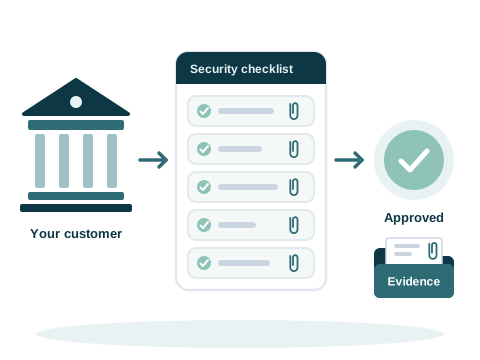
A bank sends a security checklist, each question is answered with its evidence attached, and the checklist comes back approved

Use case 7 · Virtual CISO and GRC

Passing customer security checks

The problem

Banks and insurers send security checklists (The questions a customer sends before it buys, to check how a supplier protects its data.) before they buy. A growing company may have no security head yet.

What we do

  • A virtual CISO leads your governance, risk and compliance
  • We answer the checklists with you, through to approval
  • Policies, high availability and disaster recovery put in place

Who it is for

  • Startups
  • Product companies
  • Companies selling to banks

From our work: case study 6.

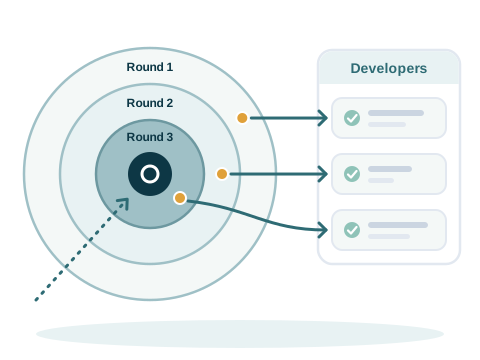
Testing in three rounds shown as three rings around a target, each round going deeper, and after each round an arrow to the developers, who fix what was found

Use case 8 · VAPT

Testing in rounds, with fixes after each round

The problem

One test shows the weaknesses of one day, and new code brings new ones. Developers are not sure how to fix what is found.

What we do

  • Testing in rounds, each deeper than the last
  • After each round, we work with your developers on the fixes
  • A plan to reduce the risk, and the work to carry it out

Who it is for

  • Finance companies
  • Real estate technology
  • Product companies

From our work: case study 1 and case study 5.
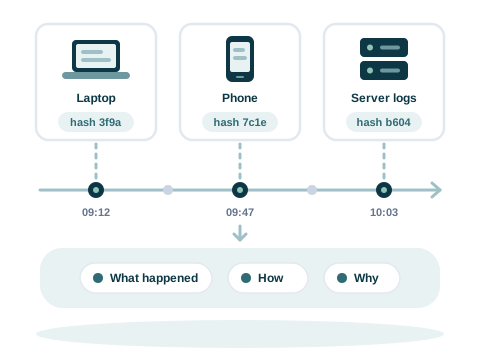
Evidence from a laptop, a phone and server logs, each recorded with its hash, placed on one timeline that shows what happened, how and why

Use case 9 · Cyber forensics

Finding the root cause of an incident

The problem

After an incident, evidence is missing or spread across systems. What happened, and why, is not clear.

What we do

  • InfiKnit Forensics, our framework for the investigation and the root cause analysis (Root cause analysis. Finding out what happened in an incident, how, and why.)
  • Digital evidence (Information stored or sent in digital form that can be used in an investigation, such as logs, files and messages.) classified, and the missing pieces found
  • Readiness (Being prepared before an incident, so the evidence an investigation needs is collected and kept.), so the evidence is there next time

Who it is for

  • Enterprises
  • Incident response teams
  • Forensic investigators
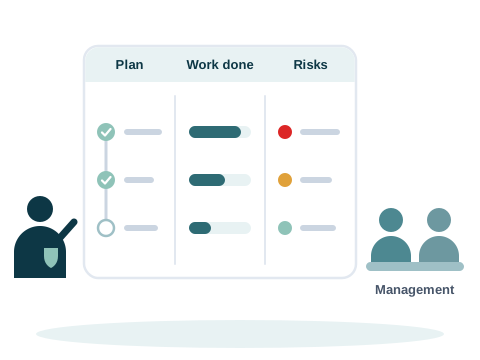
A security lead presents a board to management with three parts: the plan with two of three milestones ticked, the work done as progress bars, and the open risks marked high, medium and low

Use case 10 · Virtual CISO

Security services for a system integrator's clients

The problem

The integrator's clients in the UAE need security work from end to end, and many of them are financial organisations.

What we do

  • VAPT, risk assessment and compliance for each client
  • Fixes, including the ones that need help from a vendor
  • Security scorecards, and readiness for operations

Who it is for

  • System integrators
  • Financial organisations

From our work: case study 4.

Training and cyber forensics

With training, labs and practice

Hands-on courses from Visiminds Learn, help to set up a cyber forensics lab, and OptikRange for practice.
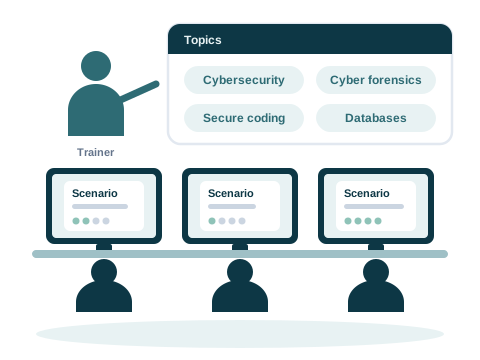
Three learners at screens work through scenario cards, and a trainer points to a board of topics: cybersecurity, cyber forensics, secure coding and databases

Use case 11 · Training

Re-skilling in cybersecurity

The problem

Fighting growing cybercrime needs trained staff. Skills fall behind new threats, AI and anti-forensics (Ways criminals hide or destroy digital evidence.).

What we do

  • Hands-on training with 100+ real scenarios
  • 100+ tools and 75+ investigation techniques
  • Courses for new recruits, before and after promotion, and refreshers

Who it is for

  • Police
  • Enterprise staff
  • Security professionals
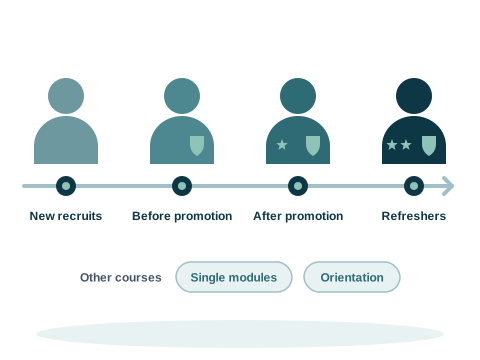
A career line with four stops for courses, new recruits, before promotion, after promotion and refreshers, with single modules and orientation sessions shown below it

Use case 12 · Training

Re-skilling in cyber forensics

The problem

New attacks bring new kinds of digital evidence. Skills must keep up with threats and AI.

What we do

  • Hands-on training for scene of crime officers (Scene of crime officer. The officer who collects evidence where a crime took place.), investigators and police
  • Existing tools automated for evidence handling
  • Malware analysis (Studying harmful software to learn what it does and how to detect it.), voice forensics (Examining recorded speech as evidence, for example to compare voices.) and triage (Sorting evidence or alerts by urgency, so the most important are looked at first.)

Who it is for

  • Forensic science laboratories
  • Regional laboratories
  • Police
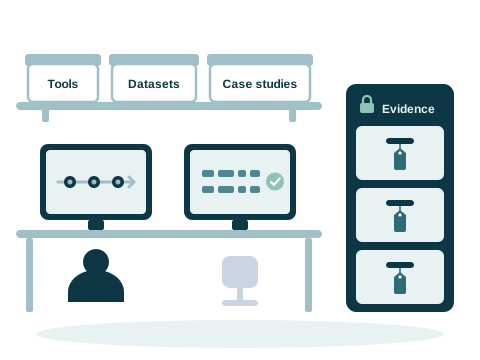
A cyber forensics lab with two workstations showing a timeline and verified hashes, an evidence locker with tagged drawers, and a shelf of tools, datasets and case studies

Use case 13 · Cyber forensics

Setting up a cyber forensics lab

The problem

Digital evidence must be sorted quickly and correctly. The techniques used to hide or destroy it must be found.

What we do

  • Custom tools built in India, with AI and language models
  • A library of forensic tools, datasets and case studies
  • Classifying, cross-referencing and linking evidence

Who it is for

  • Forensic science laboratories
  • Police
  • Large enterprises
  • Compliance agencies
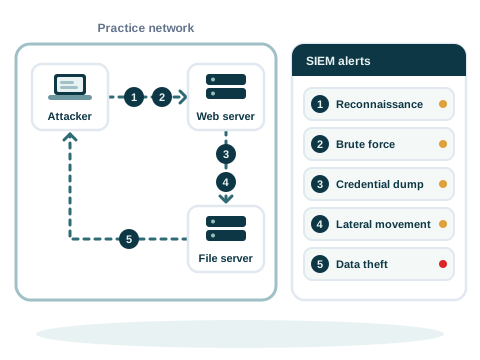
A practice network where an attack runs in five numbered steps, from reconnaissance to data theft, and a SIEM panel beside it that shows an alert for each step

Use case 14 · OptikRange

A cyber range for step by step practice

The problem

Beginners find it hard to link an attack to its alerts. There are too many alerts at once, and little step by step practice.

What we do

  • OptikRange: a simulated network with a SIEM (Security information and event management. The system that collects security alerts and logs in one place.)
  • Learners investigate the alerts and rebuild the attack
  • Learners write and publish their own scenarios

Who it is for

  • Students
  • SOC analysts (Security operations centre. The team that watches for attacks and responds to them.)
  • Instructors
  • Police

Tell us what you need

Write to info@visiminds.com with the problem you want to solve. Demos of Ivy Lens, Ivy Insight and Ivy Farsight are on request.