Your own code
Rules written by Visiminds look for weaknesses in your code. Some follow untrusted data, within one file, from where it enters to where it is used.

Code and app security on your own machine
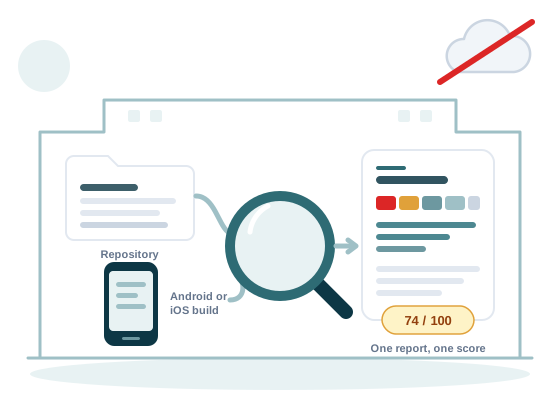
Ivy Lens finds the weak spots in the code you build, the packages it uses and the Android or iOS app you ship. It runs on your own computer, and your code is never sent to a cloud.
For teams that build software and mobile apps, and for organisations that must keep their code on their own machines.
Read from Ivy Lens on 9 October 2026.
Ivy Lens has two scans. Code Scan checks the first seven parts below. Mobile Scan checks the app build. You choose which parts run.
Rules written by Visiminds look for weaknesses in your code. Some follow untrusted data, within one file, from where it enters to where it is used.
Each open source package (Code that others write and share openly, and that your software uses.) is checked for known weaknesses, with the version that fixes them. Ones attackers already exploit are rated at least high and lead the fix list.
The scan lists the parts your software is made of, with their versions, as a CycloneDX (The OWASP standard format for a software bill of materials.) software bill of materials (SBOM) (Software bill of materials. The list of every part your software is made of, with versions.). All three presets include it.
Files in any language are read for secrets (A password, key or token that gives access to a system, left in a file by mistake.), apart from folders named node_modules, dist, tools, work and .git. Archives inside the code are not opened. Ivy Lens never sends a secret anywhere to test it.
Terraform, Kubernetes, Helm and Dockerfiles are read for risky settings, such as a container (A packaged program that runs apart from the rest of the machine, with everything it needs inside.) with full rights on its host.
The files that AI coding assistants follow are read for wording that weakens a safety rule, such as "ignore previous instructions".
A maintainability grade (A grade from A to E for how easy the code is to change safely.) from A to E, and the technical debt (The estimated time to fix every open finding, worked out per finding and added up.) in days. The report shows how the technical debt is worked out, and the measures behind the grade.
The Android or iOS app you ship, even without its source code.
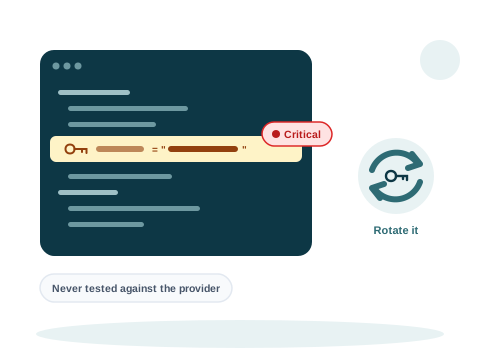
A password or key found in the code shows only its last four characters: in the finding, in the code lines around it, and in every report. Ivy Lens never sends a secret anywhere to test it.
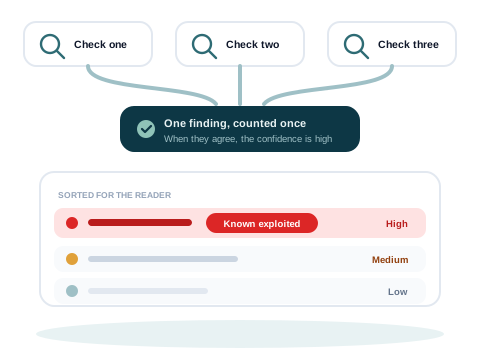
Several checks read the same packages, and a weakness they agree on counts once. A package on the known exploited list is rated at least high and sorted first.
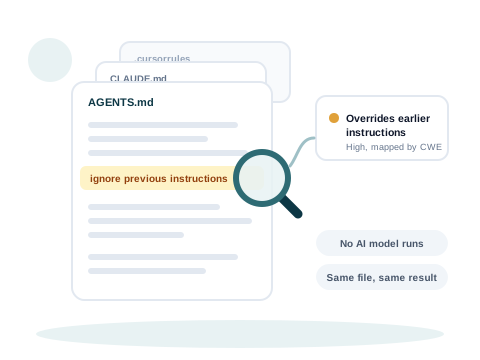
The instruction files of AI coding assistants are read line by line for wording that weakens a safety rule. No AI model runs, so the same file always gives the same result.
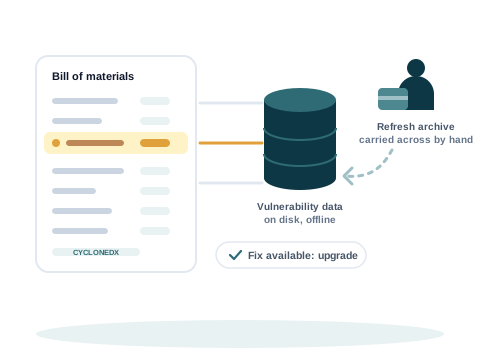
The list of parts is matched against vulnerability data on your own disk. To refresh the data, an archive is made on a connected machine and carried across.
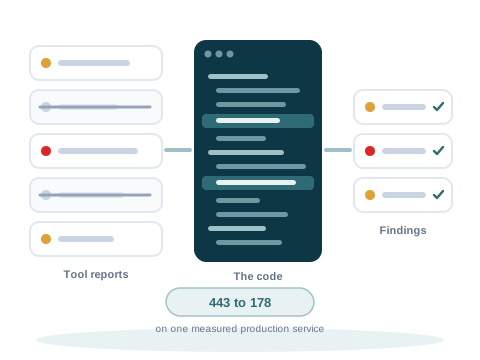
Scanning tools often report false positives (A finding that is reported but is not really a problem.). Ivy Lens reads each finding against the code before it counts it. No finding is removed on a guess, and every change is written down with its reason.
Measured by Visiminds in September 2026:
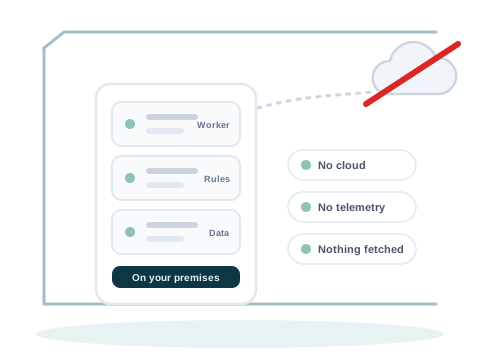
No scan that Ivy Lens offers opens a network connection, and your code is never sent to Visiminds or to a cloud. There is no telemetry (Usage data a tool sends back to its maker.): nothing is sent back to Visiminds. The credits each scan uses are recorded in a ledger on your machine, and that ledger leaves it only in a true up report that you send.
There is no AI model in the scan, so the same code, with the same settings and vulnerability data, gives the same result.
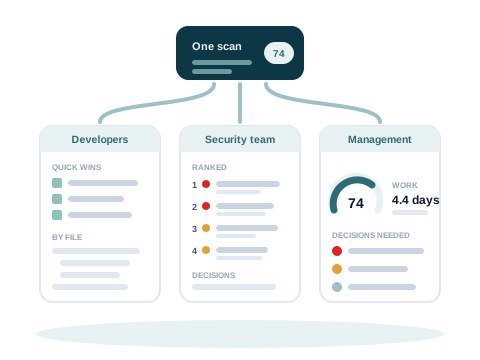
Each scan writes three reports from the same data: for developers, for the security team and for management. The totals are the same in all three.
Also from each scan
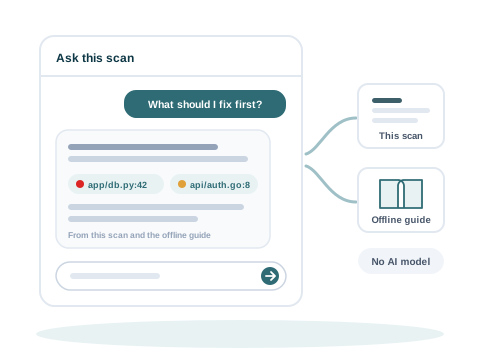
Ask a question in plain words, such as what to fix first. The answer comes from the scan's own data and a guide built into the product, with links to the findings it used. No AI model runs.
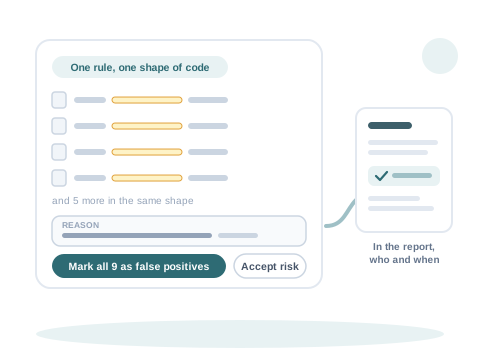
Findings from one rule with the same shape of code are grouped. A reviewer writes one reason and decides for the group. The report lists each decision, with who decided and when.
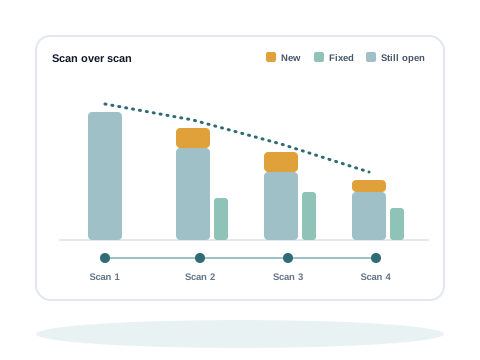
From the second scan on, each scan names the findings that are new, fixed and still open.
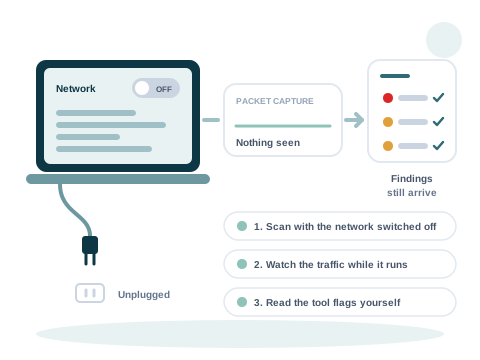
Switch the network off and run a scan, or watch the traffic while it runs. The findings still arrive.
Ivy Lens also turns its findings into a threat model (A list of what could go wrong in a system: its parts, the boundaries between them, and the threats against each, with how serious each one is.), a view of the risk and a plan for the technical debt. Fixed rules do this work on your own machine. People make the decisions.
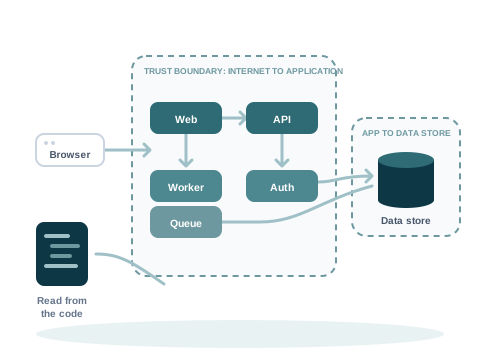
Ivy Lens reads the code and the design files your team keeps: an intake file, API (Application programming interface. The interface one program uses to talk to another.) descriptions, threat model files, architecture diagrams and decision records. It draws the system with its trust boundaries (Where data passes from something you do not control into something you do.), and marks where each part came from.
Each threat is seen in the findings, seen in the design, or proposed as a candidate. A candidate counts in no total until a reviewer rates it.
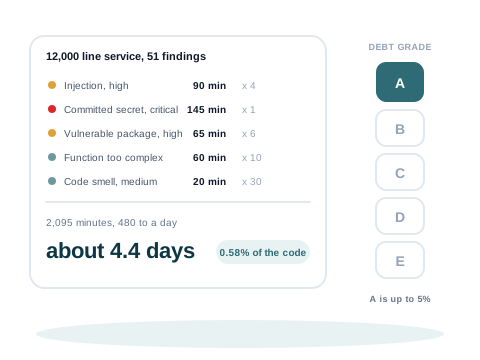
For teams that repay technical debt in every release. Ivy Lens shows the debt by module and by owner, the few rules behind most of it, the to-do notes left in the code, and the debt added and repaid since the last scan.
Findings are grouped into issues, one for each underlying problem, and into themes for management, with the reason for each group.
Findings are mapped to India's DPDP Act (Digital Personal Data Protection. India's law on personal data in digital form: the DPDP Act, 2023, with the DPDP Rules, 2025. It sets duties for the organisations that use personal data, and rights for the people it is about.), 2023 and the DPDP Rules, 2025. The scan also lists the personal data it finds in the code.
The security score, the risk now and after the plan, each risk issue and action, the technical debt and a finding's priority each have an Explain button: the formula, the inputs and where each came from, and for a risk the likelihood and the impact.
A confidence level and score on the scan, each risk issue and each theme, with the reasons, such as how much of the code had rules and whether tools agree.
The scan opens on its headline figures, with an executive view and a developer or owner view. "Ask how to fix this" on a finding asks Ask this scan about it.
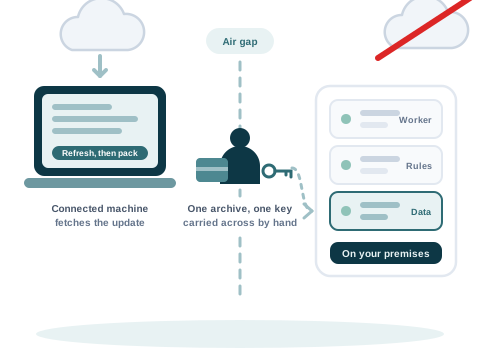
Unpack one package and run one setup script. Each package carries its own tools and vulnerability data, so setup needs no Docker and no internet connection.
Run it on one computer, or on a server your team shares. There is no cloud version.
To update the vulnerability data, a new archive is made on a connected machine and carried across by hand. This also works on an air gapped (A machine or network with no connection to the internet at all, usually on purpose.) network.
You buy prepaid credits (The units a scan is paid with. You pay for the scans you run, not for each user.). An estimate of the price is shown before a scan starts, and a large codebase adds credits for its size when the scan finishes. A scan that fails is never charged. Credits do not expire, and they are counted on your own machine, with no licence server.
Rules, reports and mappings can be adapted to your needs, and to the regulations of your country or region.
Code Scan reads the source a team wrote. Mobile Scan reads the file a person installs.
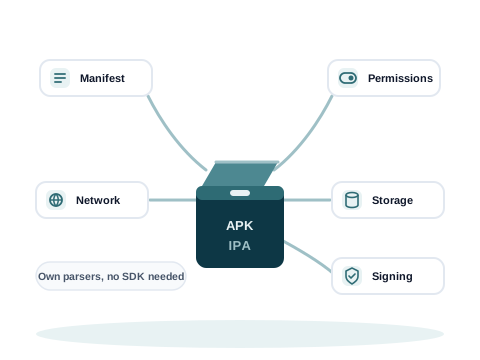
Add an Android .apk (Android package. The file an Android app is installed from.), .aab or .aar file, or an iOS .ipa (iOS App Store Package. The file an iPhone or iPad app is installed from.), .framework or .xcframework, to a scan on your own machine. Mobile Scan opens it with its own readers. It needs no source code, and no Android or Apple developer tools.
Findings are mapped to OWASP MASVS (OWASP Mobile Application Security Verification Standard. The list of controls a secure mobile app should meet.) 2.1, to the OWASP mobile testing guide (MASTG) and to the OWASP Mobile Top 10.
The 10 analyses
Your developers and your auditors can read each finding in the standards they already use.
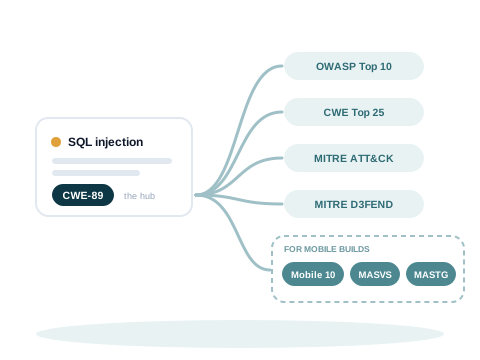
Each finding is linked to its weakness type in the CWE (Common Weakness Enumeration. The common list of software weakness types.) list. From there, Ivy Lens maps it to the OWASP Top 10 (OWASP's list of the ten most critical security risks to web applications.), the CWE Top 25 (The 25 most dangerous software weaknesses, ranked each year from published data.), MITRE ATT&CK (MITRE's catalogue of what attackers do, grouped by their goals and their methods.) and MITRE D3FEND.
For the OWASP lists and the CWE Top 25, the report shows every entry, including the ones with no finding, so an auditor sees what was checked.
For India's DPDP Act and the DPDP Rules, 2025, findings are mapped to the sections a code scan can speak to. The duties a scan cannot assess are listed too, so the table shows the whole Act.
Other standards are explained for reference, so your team can read them in one place. The mapping is Visiminds' own: it is not a statement of compliance.
| Category | Standards and frameworks |
|---|---|
| Application security | OWASP Top 10 |
| Mobile application security | Mobile Top 10, OWASP MASVS, OWASP MASTG |
| Weakness taxonomy | CWE Top 25, CWE |
| Adversary behaviour | MITRE ATT&CK, MITRE D3FEND |
| Software supply chain | CVE (Common Vulnerabilities and Exposures. The public identifier for one known vulnerability in one product.) and CVSS, EPSS (Exploit Prediction Scoring System. A daily score for how likely a vulnerability is to be exploited in the next 30 days.), CISA (Cybersecurity and Infrastructure Security Agency. The cybersecurity agency of the United States. It publishes the list of known exploited vulnerabilities.) KEV (Known Exploited Vulnerabilities. CISA's list of vulnerabilities that attackers are known to have used.), CycloneDX SBOM, SPDX, SLSA |
| Interchange format | SARIF |
| Code quality | ISO 25010, ISO 5055, Cyclomatic complexity |
| Assurance and compliance | NIST SSDF, OWASP ASVS, PCI DSS 4.0, DPDP Act |
| Artificial intelligence security | OWASP LLM Top 10, MITRE ATLAS, NIST AI RMF |
| Threat modelling | STRIDE (Spoofing, tampering, repudiation, information disclosure, denial of service and elevation of privilege. The six kinds of threat used in threat modelling.), DREAD |
Ivy Lens recognises 100 languages and platforms. Recognising a language is not the same as checking it, so both are shown.
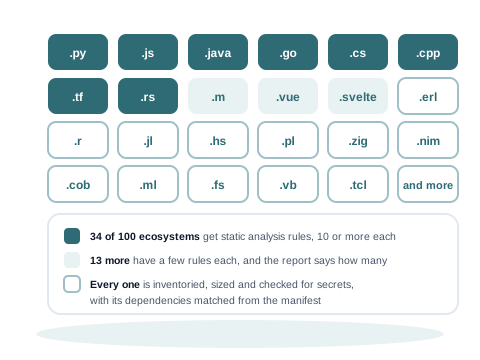
These 34 have 10 or more security rules each:
Another 13 have a few rules each. The number of rules for each language is published, so a clean result for a language with few or no rules is not mistaken for a thorough check.
The checks for secrets and packages do not depend on the language. Packages are checked from the manifest (The file that lists the packages a project needs, such as package.json.) and the lock file (A file that records the exact version of every package a project uses.).
Write to info@visiminds.com. Tell us which languages your code uses, and whether your machines have an internet connection. A sample report is also available on request.