Visiminds Technologies, home

Vulnerability assessment of running systems

Checks the systems you run

Ivy Insight finds the weak spots in the systems you already run: what is open to the internet, websites and APIs (Application programming interface. The interface one program uses to talk to another.), servers, cloud accounts and databases. It can run fully inside your network.

For security teams, and for the engineers who fix what it finds. Run it as often as you like, by hand or on a schedule (daily or weekly), before and after a release.

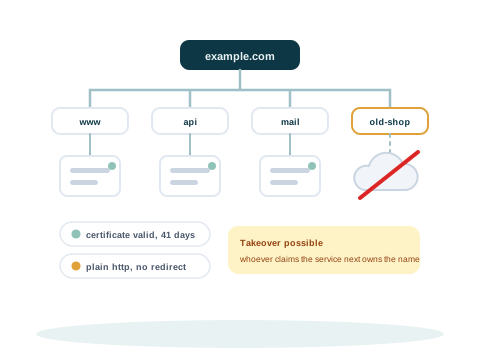
A domain at the top with the names beneath it discovered one by one, and one name still pointing at a cloud service that no longer exists, flagged as a takeover

11 engines

What it checks

Each engine checks one area. All of them write findings (One problem a check reports, with its evidence and how to fix it.) the same way, and each one records what it could not check. A full assessment runs every engine that applies to a system in one scan.

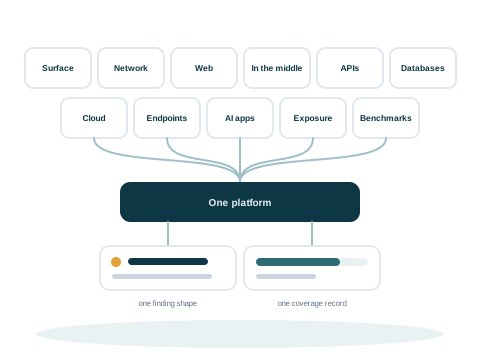
Eleven kinds of scan, each a tile, feeding one platform that turns every one of them into the same finding shape and the same coverage record

External attack surface

Subdomains (A name under your main domain, such as shop.example.com.), certificates, dangling records (A DNS name that still points to a service that no longer exists, which someone else could claim.), and the services published to the internet.

Network infrastructure

Open ports, the services behind them, and the ones that should never be reachable from a network.

Web applications

Response headers, cookies, exposed files, allowed methods and cross origin policy (Browser rules on which other sites may read a page.) on a live site.

  • Active checks only if your policy allows

APIs, REST and GraphQL

Authentication, and whether one identity can read or change what belongs to another.

  • Needs two accounts you provide

Databases and middleware

Data stores, queues and caches reachable without a credential.

Exposure and versions

Secrets (A password, key or token that gives access to a system, left in a file by mistake.) served to the public. Service versions are recorded, and known vulnerabilities in running services are found by the network and web checks.

Cloud posture

Accounts and their configuration, against the provider's own rules and the benchmark (A published list of secure settings for one kind of system, checked one control at a time.).

  • Needs a read-only credential you grant, and the Prowler tool

Endpoints

Laptops and workstations, including remote ones, judged from what an agent on each machine reports. The agent connection is not available yet.

  • Needs an agent on each machine, not available yet

Benchmarks

Secure settings on hosts, control by control, with the command and its output kept as evidence.

  • Needs a credential you grant
  • Linux hosts

AI applications

Prompt injection (Text that tricks an AI model into ignoring its instructions.), data exposure and the permissions handed to tools.

Adversary in the middle

Whether an attacker on the path could read or alter the traffic: TLS (Transport Layer Security. The encryption that protects traffic between a browser or app and a server.) enforcement, HSTS (HTTP Strict Transport Security. A setting that tells browsers to use only encrypted connections to a site.), cookie flags, mixed content (An encrypted page that loads some of its parts without encryption.), and secrets carried in URLs.

What each scan tells you

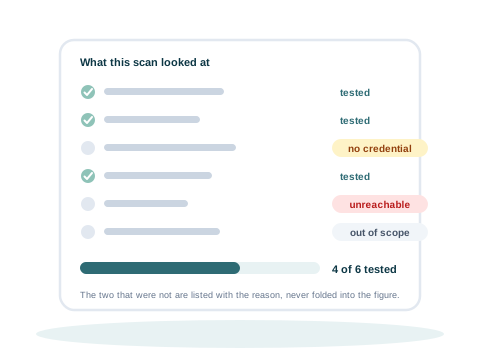
A list of checks from one scan: most marked tested with a tick, and the rest recorded with a reason such as unreachable, no credential or out of scope, beside the coverage figure they add up to

Shows what it covered and what it left out

Every check ends as tested, not applicable, or not done. A check that was not done is recorded with one of 20 reasons, such as no credential, host unreachable or out of scope.

Every report opens with this list. So a gap is never mistaken for a clean result, and you know what to set up before the next scan.

  • A check that could not run never counts as a pass
  • A host that cannot be reached keeps its open findings
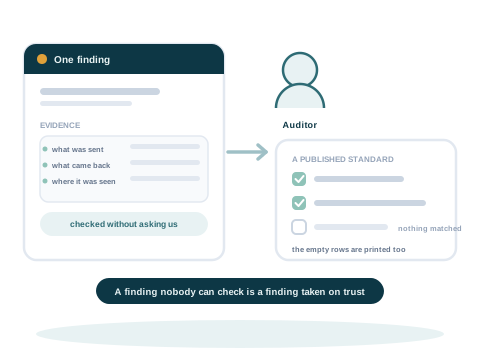
A finding with the evidence it rests on, handed to an auditor who ticks the standard it answers and keeps the record

Evidence on every finding

Each finding carries what the scanner saw: the request and the response, or the command and its output. Your team can trust a finding, or dismiss it, without running the scan again.

  • A finding keeps one identity from scan to scan, so a false positive stays dismissed, and an accepted risk stays accepted until its end date
  • A fixed finding that comes back is opened again
  • Closing a ticket does not close a finding. Only a check that runs again and no longer finds the problem does
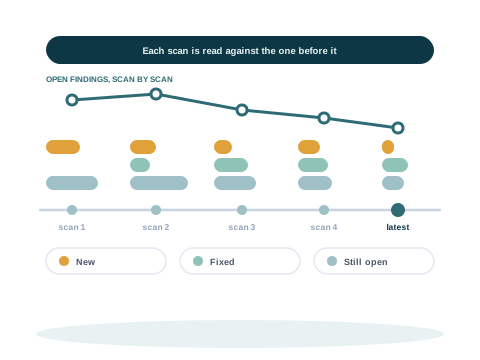
Five scans along a timeline, each compared with the one before it, showing what is new, what has been fixed and what is still open

Each scan read against the one before

Each scan names what is new, what has been fixed and what is still open since the last one, so progress shows scan by scan.

Reports, made when a scan ends

PDF and web page

For sending, filing and signing off, with every finding and its evidence.

Workbook, CSV, JSON and SARIF

For sorting, for scripts, and for the tools that read them.

A test plan for people

What still needs a manual tester, taken from the scan's coverage.

A proof level on each finding

Confirmed, inferred from a version, or suspected, with the steps to check it yourself.

From findings to fixes

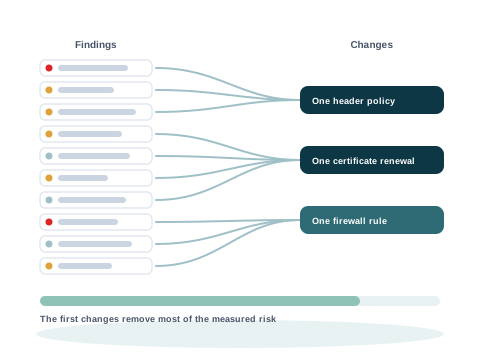
Many findings on the left converging into a few changes on the right, with a bar showing that the first few changes remove most of the measured risk

From many findings to a few changes

Forty web servers behind one load balancer (A server that shares incoming traffic between several other servers.) may all lack the same security header. That is one change, not forty problems. Ivy Insight groups the findings that share a fix into one action.

The fix plan ranks the actions by how much risk each one removes. Your team can start with the change that removes the most.

  • A fix can be one header policy, one certificate or one firewall rule
  • A finding with no shared fix stays on its own
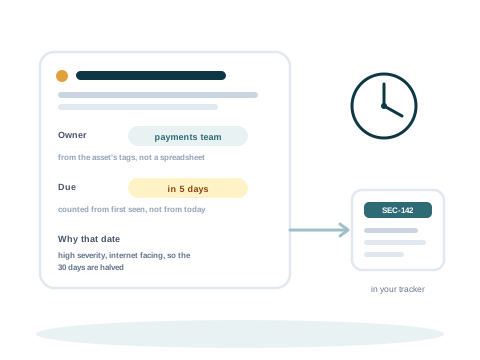
One finding with an owner derived from what the asset is, a deadline counting from the day it was first seen, and a ticket going out to the team's own tracker

An owner and a deadline on every finding

Rules you set give each finding an owner, based on what the asset (One thing you add to Ivy Insight to be checked, such as a host, a domain, a website, an API or a cloud account.) is. The owner can be a person or a team.

The deadline counts from the day the finding was first seen, so ignoring a report does not reset it.

By default, at most

Critical
7 days
High
30 days
Medium
90 days
Low
180 days
Known to be exploited (Known Exploited Vulnerabilities. CISA's list of vulnerabilities that attackers are known to have used.)
14 days

Deadlines are shorter on systems open to the internet. Your own policy can change them.

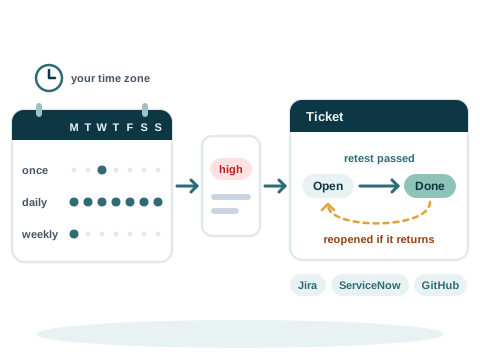
A calendar of scans that run once, daily or weekly in your time zone, a finding that opens one ticket in Jira, ServiceNow or GitHub, the ticket moved to done when a retest passes, and reopened if the finding returns

On a schedule, in your time zone

A scan can run by hand, once at a set time, every day, or on chosen days of the week. The time is a local time in the schedule's own time zone, and it stays right when the clocks change.

If the person who set a schedule loses the right to scan, the schedule turns off, with the reason.

From findings to understanding

Which findings attackers already use, how a site could be attacked, and answers to your questions, all from the scan's own evidence.

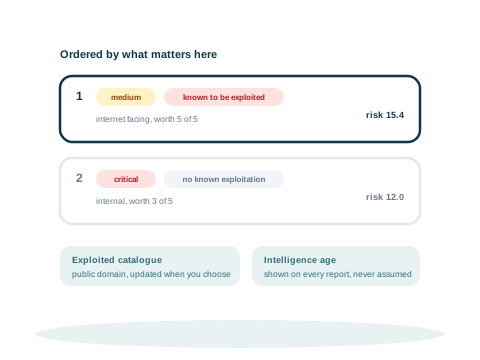
Two findings ordered by risk: a medium one on an internet facing asset worth 5 of 5, on the catalogue of vulnerabilities known to be exploited, scores 15.4 and sits above a critical one on an internal asset worth 3 of 5 with no known exploitation, which scores 12.0, with where the catalogue comes from and the intelligence's age shown beside them

Known exploitation raises the risk

Each finding's risk score counts its severity, how much the asset matters, and how exposed the asset is. A finding on CISA's (Cybersecurity and Infrastructure Security Agency. The cybersecurity agency of the United States. It publishes the list of known exploited vulnerabilities.) Known Exploited Vulnerabilities catalogue scores higher, and so does a high EPSS (Exploit Prediction Scoring System. A daily score for how likely a vulnerability is to be exploited in the next 30 days.) score.

So a medium finding that attackers already use can rank above a critical one on an internal system.

  • The catalogue and the scores are updated when you choose, or carried in as a file where there is no network
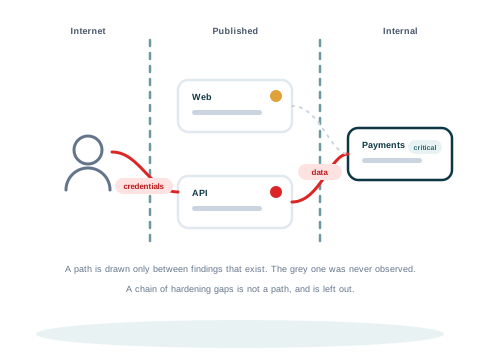
Assets across two trust boundaries, the internet edge and the internal network, with one path from outside drawn only through findings that were actually observed

A threat model of one site, from evidence

Ivy Insight draws one website, asset or scan from what the scan observed: the findings, the coverage records and the facts on the asset. Every part is marked observed, inferred, assumed or not observed.

Each threat links to the findings behind it, with its STRIDE (Spoofing, tampering, repudiation, information disclosure, denial of service and elevation of privilege. The six kinds of threat used in threat modelling.) category. Threats that were not tested are listed apart and never rated. An attack path is shown only when every step of it was observed.

  • It covers one asset or scan at a time, and is built for websites and APIs
  • It does not model business logic
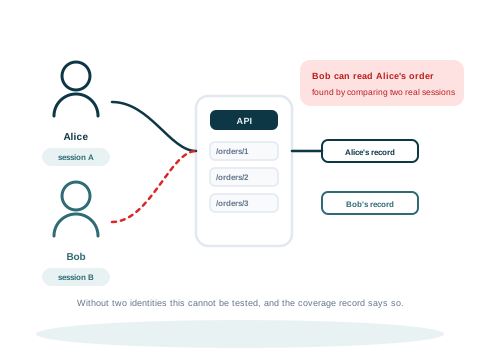
Two people each signed in to the same API, and the second one reading a record that belongs to the first, which is flagged as a broken authorisation

One user reading another user's data

With two accounts you provide, the API engine signs in as each one and checks whether one can read the other's records. This weakness, broken authorisation, is common in APIs.

Without two accounts this cannot be tested, and the coverage record says so.

Frameworks and standards

The frameworks decide which checks the engines run. Each finding is also mapped to the standards an auditor asks about.

Tested against 7 frameworks

  • OWASP Top 10 (OWASP's list of the ten most critical security risks to web applications.): checks mapped to its categories of web application risk
  • OWASP API Security Top 10: risks in APIs
  • OWASP Top 10 for Large Language Model Applications: risks in AI applications
  • CWE Top 25 (The 25 most dangerous software weaknesses, ranked each year from published data.): the most dangerous kinds of software weakness
  • MITRE ATT&CK (MITRE's catalogue of what attackers do, grouped by their goals and their methods.): what attackers do, and how
  • MITRE ATLAS: attacks on AI systems
  • CIS Benchmarks (Free lists of secure settings for each kind of system, from the Center for Internet Security.): Visiminds' own checks for part of the CIS Linux benchmark, and cloud account checks through the Prowler tool. Not a CIS certified assessment

A scan can be limited to one framework. The report then shows how much of each category was attempted.

Findings mapped to 9 standards

  • OWASP ASVS (OWASP Application Security Verification Standard. A list of security requirements a web application should meet, used to build it and to test it.) 4.0.3
  • PCI DSS (Payment Card Industry Data Security Standard. The security rules for any company that stores, processes or sends payment card data.) 4.0.1
  • NIST SP 800-53 (A large catalogue of security and privacy controls from the US National Institute of Standards and Technology.) Revision 5
  • ISO/IEC 27001 (ISO/IEC 27001. The international standard for an information security management system.):2022 Annex A (The list of security controls in ISO/IEC 27001. A company chooses the ones that apply to it.)
  • NIST Cybersecurity Framework (NIST Cybersecurity Framework. A widely used framework from the US National Institute of Standards and Technology for organising security work.) 2.0
  • SOC 2 (An audit of how a service company protects customer data.) Trust Services Criteria
  • HIPAA (Health Insurance Portability and Accountability Act. A United States law that protects health information. Its Security Rule says how that information must be kept safe.) Security Rule
  • MITRE CAPEC (Common Attack Pattern Enumeration and Classification. MITRE's catalogue of the ways attackers break into software.)
  • EU Cyber Resilience Act (The European Union law that sets security rules for products with digital parts, such as software and connected devices.)

Runs where you choose

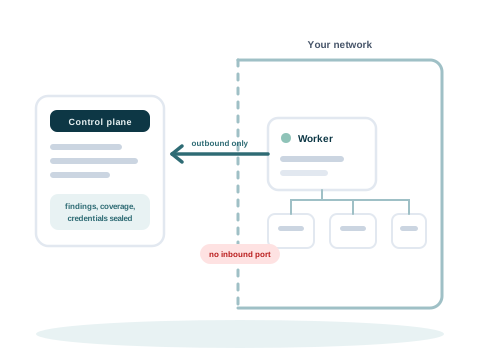
A control plane on one side and a customer network on the other, with a worker inside the network whose only connection is an arrow pointing outward to the control plane, and no arrow pointing in

Workers inside your network

Every part installs on your own hardware, even with no internet connection: the database, the control plane (The central server that plans the scans and keeps the results.), the interface and the workers (The part that runs the checks, close to the systems it checks.). Ivy Insight can also run as a service.

The control plane plans the scans and keeps the results. The workers run the checks, close to the systems they check.

  • The control plane never connects to the systems being checked
  • A worker makes outbound connections only: you open no inbound port and add no inbound firewall rule
  • A worker receives a credential only for the task it is running

Licensed by use, not by seat

One credit (The units a scan is paid with. You pay for the scans you run, not for each user.) for each asset and engine, from a balance you can see. You pay for scans, not for each user. The licence also sets how many workers an organisation can enrol.

Your data stays with you

The data about your systems goes only where you tell it. The one exception is attack surface discovery, which looks up your domain name in public subdomain sources. A stored credential is encrypted, and no user can read it back.

Ask for a demo of Ivy Insight

Write to info@visiminds.com. Ivy Insight complements Ivy Lens, which checks the code you build.